Some businesses deal in two units at once. A cloth trader sells by the meter but the buyer wants the weight in kilograms on the bill. A wire seller quotes per coil but also lists total kilograms. Until now the invoice showed one quantity and one unit. This update lets you add a second unit to a product, and AxiomSquare works out the second quantity for you on every invoice.
One thing to be clear about from the start. FBR only ever receives your primary unit, the one tied to the HS code. The secondary unit is for your invoice and your buyer. It does not change anything you report to FBR.
Step 1. Set the two units on the product
Open a product (or add a new one) and go to the FBR fields. You already choose a primary Unit of Measure there. Just below it you will now see a Secondary unit box. Pick a secondary unit and enter the conversion factor, which is how many secondary units make up one primary unit.
For example, if 1 meter of your cloth weighs 1.5 kilograms, you set the secondary unit to Kilogram and the factor to 1.5.
Leave the secondary unit blank for any product that only needs one unit. Those products behave exactly as before.
Step 2. Make the invoice as usual
On the invoice, pick the product and enter the quantity in the primary unit. The quantity box now shows the unit in its label, for example Quantity (Meter), so there is no confusion about what you are typing. Right under it, AxiomSquare shows the computed secondary quantity. You do not type this, it updates on its own as you change the primary quantity.
Step 3. The invoice shows both
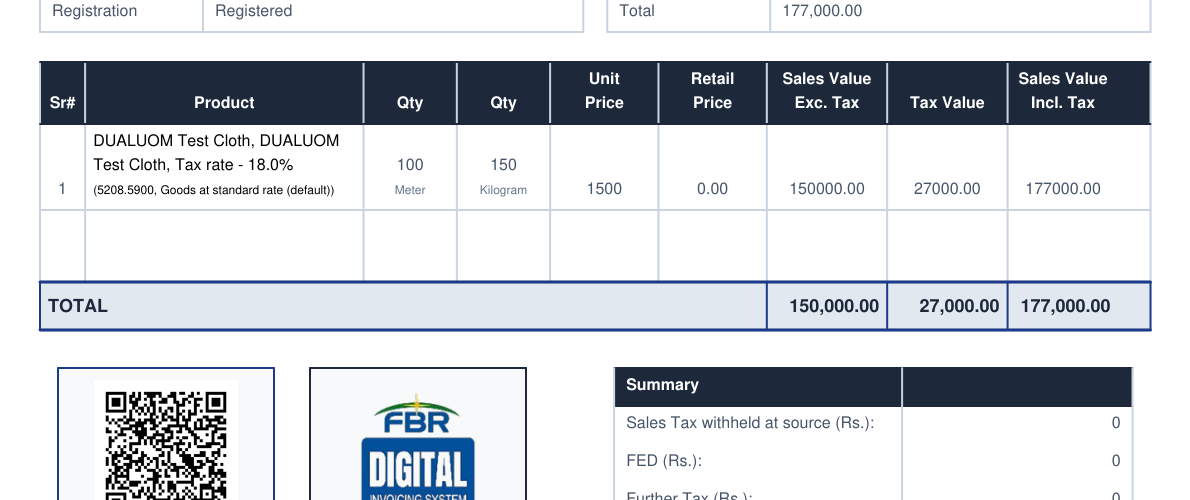
On the printed or downloaded invoice, a product that has a secondary unit shows two quantity columns. The number sits on top and the unit under it, so each column is easy to read. A product with only one unit shows a single quantity as before, and the extra column is added only when at least one item on the invoice actually needs it.
Good to know
- FBR receives only the primary unit and its quantity. The secondary unit never goes to FBR.
- Prices and tax are calculated on the primary quantity, the same as always. The secondary quantity is there for reading, not for pricing.
- Change the primary quantity on an invoice and the secondary updates by itself.
- If you later change a product's factor, invoices you already made keep their original figures.
Try it on your next invoice
Open a product, set a secondary unit and factor, then make an invoice. That is all it takes.
Open AxiomSquareNeed a hand setting this up for your products? Reply to this update and our team will help.