HS code stands for Harmonized System code, sometimes written as PCT code in Pakistan since it follows the Pakistan Customs Tariff. It is an internationally standardised number that classifies exactly what a product is, down to a fairly specific level, and it did not start as a tax concept at all. Customs authorities worldwide have used it for decades to classify goods crossing borders. FBR's digital invoicing rules borrow the same system for a different reason: to know precisely what was sold on every domestic sales tax invoice too.
Why an invoice needs one at all
A free-text product name is not something a computer system can reliably tax. "Rice" could mean a dozen different tariff categories with different rules attached. An HS code removes that ambiguity. Once a line item carries a code, FBR's system knows precisely what category of goods it is looking at, which in turn is how it works out things like the correct sales tax rate, whether a reduced rate or exemption under a specific SRO applies, and whether the item falls under any special reporting rule.
How it decides your tax rate
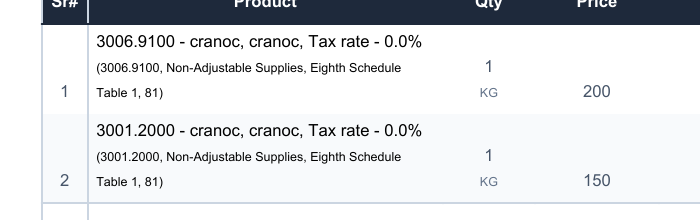
This is the part that catches people off guard. The tax rate on a digital invoice is not something you type in freely the way it might have been before. It is generally tied to the HS code and sale type you select for that item. Pick the wrong code and you can end up with the wrong tax rate on an otherwise correct invoice, which is exactly the kind of error that shows up as a validation failure when you submit.
Where to find the right code
You do not need to memorise the Pakistan Customs Tariff. Every FBR-connected invoicing system, AxiomSquare included, ships with FBR's own reference list built in, so you search by product description rather than by code. The practical approach is to set the HS code once on each product when you first add it to your catalogue, the same way you would set a price or a unit of measure. After that, every invoice using that product carries the correct code automatically, and you are not looking anything up mid-sale.
If your catalogue is large, it is worth budgeting a bit of time upfront to get codes right across your products rather than rushing it product by product as invoices come up. A wrong code that goes unnoticed for months means every invoice using that product carried the wrong tax classification the whole time.
What happens if you get it wrong
In most cases FBR's validation catches an obviously mismatched code or rate at submission time and rejects the invoice with a specific error, which is corrected and resubmitted. The more concerning case is a code that is technically accepted but not actually the right classification for the item, since that can pass validation while still being wrong for tax purposes. This is one area worth a short conversation with your tax consultant when you first set up your product catalogue, rather than guessing.
HS codes, set once per product
AxiomSquare's product form searches FBR's own HS code list as you type, so you pick the right code once and every invoice after that gets it right automatically.
See AxiomSquareGeneral information, not tax advice. Confirm the correct classification for your products with your tax consultant.